Guides
Sony FX3 Hire London: Kits, Day Rates and What to Pack
Choosing a Sony FX3 hire in London? Compare body-only, 16-35mm GM and DJI Mic 3 kits, see the specs that matter on set, what to pack and how Soho pickup works.
The short version
On this page6 sections
The Sony FX3 is the compact full-frame cinema camera that many London shooters ask for first. It is small enough to work handheld or on a gimbal, yet it records footage that sits comfortably next to larger cinema bodies. If you are weighing up a Sony FX3 hire in London, the real questions are practical: which kit to book, what the day rate covers, what else to bring and how collection works.
This guide walks through the FX3 kits on LighRent, the specs that actually change how you shoot, the cards, power and rigging to pack, the picture profile choice and the pickup in Soho. Day rates are set by each owner and shown on the listing, so check the live price on the kit you want before you book.
Which FX3 kit to hire
Most rental houses list the FX3 as a body and leave you to work out the rest. On LighRent, the FX3 listings from SwainUK come as body only, body with a wide zoom, or a ready-to-shoot kit with wireless audio. The right choice depends on what you already own and whether you are shooting alone.
Body only
Book the Sony FX3 body if you already have E-mount lenses, or if the job needs a specific lens that is not in a kit. This is the lowest day rate of the FX3 options, and it gives you the most freedom. If you need glass to go with it, browse lens hire in London and collect both on the same trip where you can.
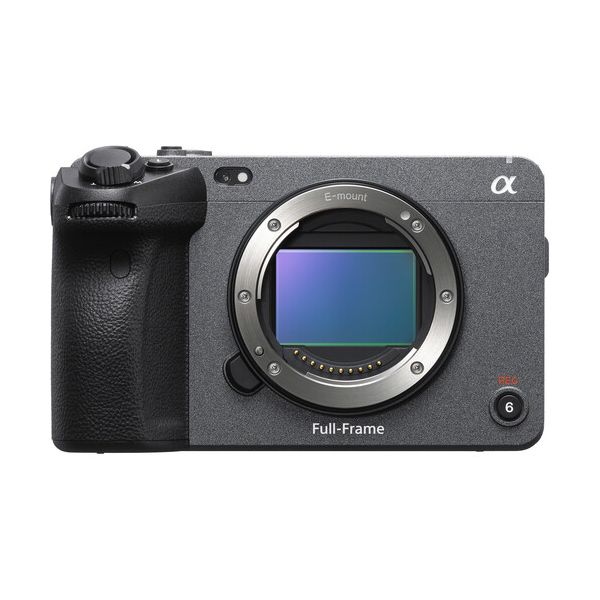
Body only suits camera operators who carry their own lenses, productions with a dedicated lens package, and second-camera roles where the FX3 is matching an existing setup.
FX3 with 16-35mm GM
The Sony FX3 with 16-35mm GM is the kit to book if you want to turn up and shoot. A wide zoom covers tight interiors, walk-and-talk shots, events, property tours and handheld work where you cannot step back. It also keeps the camera compact enough for a gimbal.
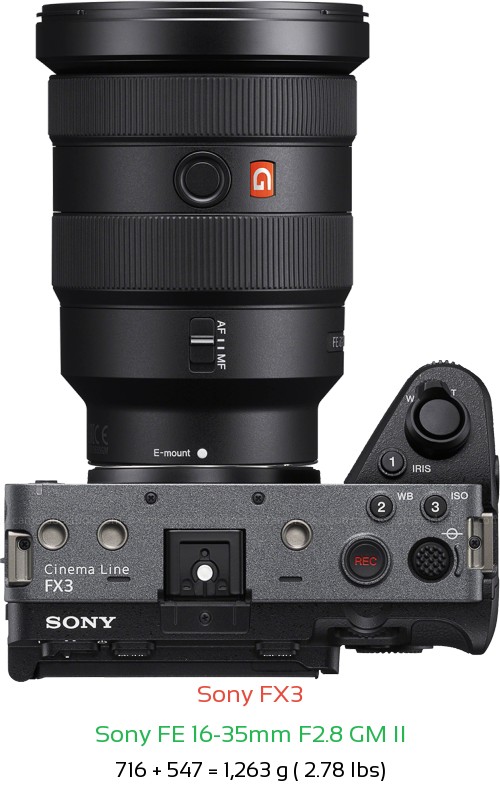
The trade-off is reach. A wide zoom is not the lens for tight, flattering interview close-ups from a distance. If the brief is mostly talking heads, think about adding a longer lens or choosing the body and building your own package.
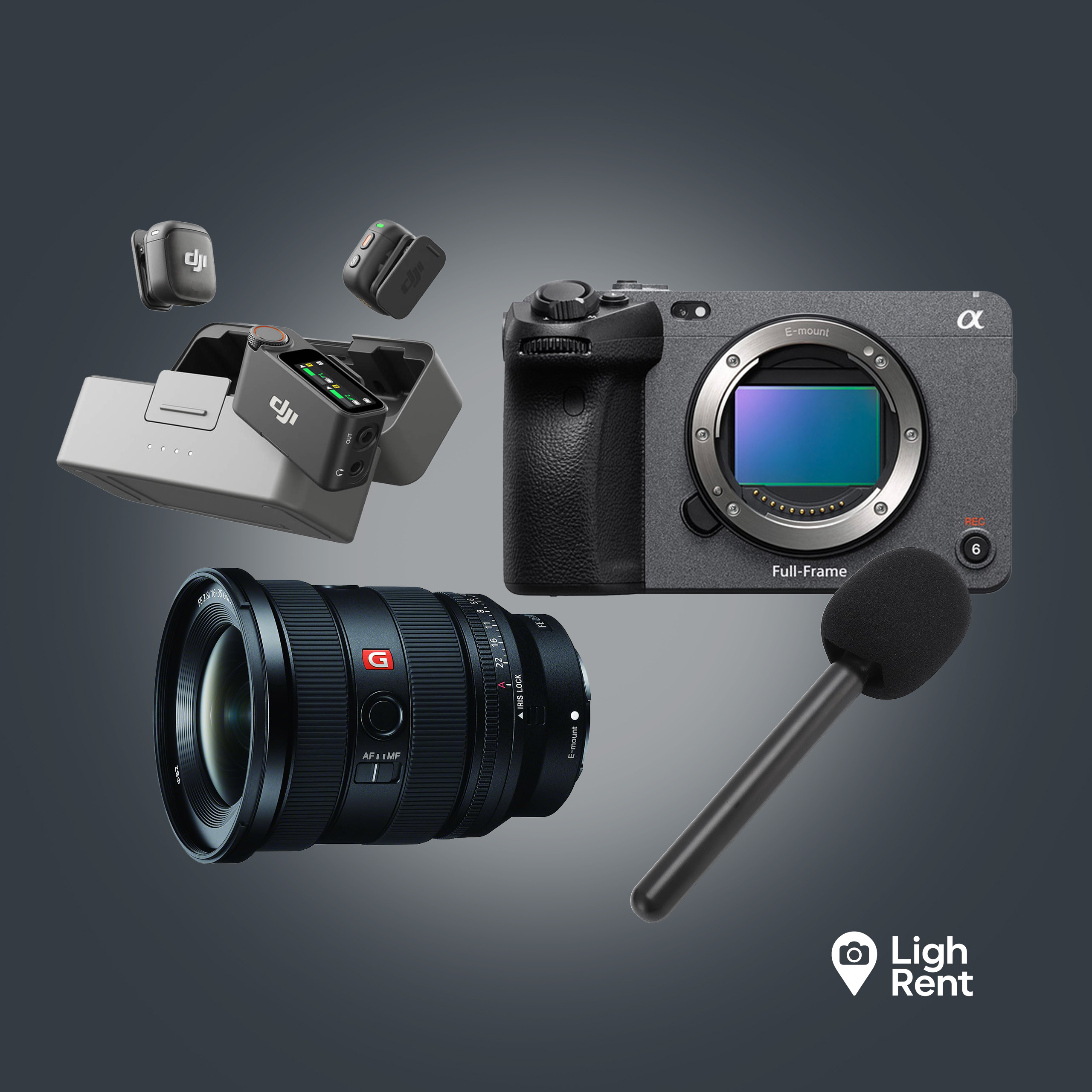
FX3 with 16-35mm GM and DJI Mic 3
For one-person shoots, the Sony FX3 with 16-35mm GM and DJI Mic 3 kit is the most complete option. You get the camera, the wide zoom and a wireless lavalier system in one booking. That covers interviews, documentary, vox pops, behind-the-scenes and corporate content where you are both the camera operator and the sound recordist.
Wireless lavs clip onto your subject and send clean audio straight to the camera, so you are not relying on the on-board microphone. It also means one booking, one pickup and one return, which matters when you are working alone.
| Kit | Best for | What you might add |
|---|---|---|
| Body only | Shooters with their own E-mount lenses, second camera roles | Lenses, audio, cage |
| FX3 with 16-35mm GM | Interiors, events, handheld and gimbal work | Audio, a longer lens for close-ups |
| FX3 with 16-35mm GM and DJI Mic 3 | One-person interviews, documentary, social content | Spare batteries, cards, a cage |
If you are still deciding whether the FX3 is the right body at all, compare it with other cinema cameras on LighRent, or look across wider camera hire in London for stills and hybrid options.
The FX3 specs that matter on a hire day
Spec sheets are long. These are the numbers that change how you plan a shoot. All figures below come from the B&H Sony FX3 specifications.
- Sensor: full-frame 12.1MP, with 10.2MP effective for video. The lower resolution is a deliberate choice for video, and it is a big part of why the camera handles low light well.
- Recording: 4K up to 120p, and 10-bit 4:2:2 internally. That means smooth slow motion in 4K and enough colour information to grade without the image falling apart.
- Picture profiles: S-Cinetone, S-Log3 and HLG are built in. More on choosing between them below.
- ISO: 80 to 102,400, expandable to 409,600. In practice you can shoot dim interiors, evening exteriors and practical-lit scenes without a large lighting package.
- Media: dual CFexpress Type A / SD card slots. You can record to both at once for a backup, which is worth doing on any paid job.
- Stabilisation: 5-axis in-body stabilisation. Handheld footage is steadier, and it works with any lens you mount.
For background on where the camera sits in Sony's range, the Sony FX3 entry on Wikipedia is a useful overview.
What this adds up to: the FX3 is strong for run-and-gun, low light and small crews. It is less suited to jobs that need built-in ND filters, a large on-board monitor or a shoulder rig out of the box. For those you either rig it up or choose a bigger body.
What to pack: cards, power and a cage
Few hire pages tell you what an FX3 day actually needs beyond the camera. Check each listing to see exactly what is included, then fill the gaps before you leave home.
Memory cards
The FX3 takes CFexpress Type A and SD cards in its dual slots. CFexpress Type A gives the most headroom for the heaviest recording modes, such as 4K at high frame rates. Fast SD cards work for many everyday settings. Before the shoot, match your recording settings to the speed rating of your cards, and format them in the camera at the start of the day.
- Bring enough cards to avoid offloading in the middle of a take.
- Record to both slots when the job cannot be reshot.
- Pack a card reader and a portable drive so you can back up during breaks.
Power
The FX3 is compact, and so are its batteries. On a long day, especially with high frame rates or in cold weather, you will get through more than you expect. Check how many batteries the listing includes, bring spares if you own compatible ones, and pack a charger so you can top up at lunch. If a location has mains power, a charging station on the table saves a lot of worry.
A cage
The FX3 has mounting points on the body, but a cage makes it far easier to work with. The SmallRig handheld cage for Sony FX3 gives you handles and extra mounting points for a monitor, a wireless receiver or a top light. It also protects the body from knocks on a busy set.
Small things that save a shoot
- ND filters for the lens, since the FX3 has no built-in ND.
- A lens cloth and blower.
- Gaffer tape and cable ties for tidying audio leads.
- A rain cover or a simple plastic bag for exterior work.
Picture profiles: S-Cinetone or S-Log3
The FX3 offers S-Cinetone, S-Log3 and HLG. Your choice should depend on your edit, not on what looks impressive in a spec list.
S-Cinetone
S-Cinetone gives a finished, pleasant look straight from the camera, with natural skin tones. It suits fast turnarounds: social content, event highlights, corporate interviews and anything you need to deliver the same day. You can still make small adjustments in the edit, but the footage looks good without a grade.
S-Log3
S-Log3 records a flat image that holds the most detail in highlights and shadows. It looks washed out on the monitor and needs grading before delivery. Choose it for music videos, short films, commercials and high-contrast scenes like bright windows behind a subject. Exposure matters more in S-Log3, so use the camera's exposure tools and a LUT on your monitor to judge the image properly.
HLG
HLG is for HDR delivery. Use it only when the client or platform has asked for HDR, and check your edit setup can handle it.
| Profile | Choose it when | Watch out for |
|---|---|---|
| S-Cinetone | Quick delivery, interviews, events | Less room to recover clipped highlights |
| S-Log3 | Graded projects, high-contrast scenes | Needs careful exposure and time in the grade |
| HLG | HDR deliverables | Only useful if the whole pipeline supports HDR |
A simple rule on a hire day: if nobody has booked time for a colourist, shoot S-Cinetone.
Collecting the kit in Soho
The FX3 kits from SwainUK are collected in Soho, which is easy to reach from most of central London. You can see other options nearby on the camera hire in Soho page if you want to pick up extra kit on the same trip.
Booking and the deposit
Book through the listing and check the dates, the day rate and what is included before you pay. Some owners ask for a refundable deposit. If they do, it is shown on the listing as "Equipment Deposit (Refundable)" before you pay, so there are no surprises at checkout. After you return the kit, the owner has 24 hours to inspect it and either release the deposit or report damage up to the deposit amount. The full process is explained on the security deposits help page.
At pickup
- Check every item against the listing before you leave.
- Power on the camera, check both card slots and mount the lens.
- If you have the DJI Mic 3 kit, pair and test the transmitters and receiver.
- Note any existing marks so both sides agree on the condition.
At return
Return the kit on time, packed the way you received it. Remove your cards, wipe the lens and pack all the cables and chargers. A clean, complete return is the quickest way to get any deposit released.
In short: book the body if you have your own lenses, the 16-35mm GM kit if you want to shoot straight away, and the full kit with DJI Mic 3 if you are working alone. Pack cards, power and a cage, choose your picture profile before you arrive, and collect in Soho.
Questions people ask
How much does it cost to hire a Sony FX3 in London?
Day rates are set by each owner and shown on the listing, so check the live price for the kit you want. Body only is the lowest-priced option, and kits with the 16-35mm GM or the DJI Mic 3 cost more because they include extra gear. Some owners also ask for a refundable deposit, which is shown on the listing before you pay.
Is the Sony FX3 good for one-person shoots?
Yes. It is compact, has 5-axis in-body stabilisation and handles low light well, so you can work handheld without a large crew. The kit with the 16-35mm GM and DJI Mic 3 is built for solo shooters because it covers both picture and sound in one booking.
What memory cards does the FX3 use?
The FX3 has dual CFexpress Type A / SD card slots. CFexpress Type A gives the most headroom for demanding modes such as 4K at high frame rates, while fast SD cards suit many everyday settings. Match your recording settings to your cards' speed rating before the shoot.
Should I shoot S-Cinetone or S-Log3 on a hire?
Shoot S-Cinetone if you need fast delivery and have no time set aside for grading, as it looks finished straight from the camera. Choose S-Log3 for graded projects or high-contrast scenes where you need the most detail in highlights and shadows. S-Log3 needs careful exposure and time in the edit.
Can I add a microphone to an FX3 hire?
Yes. The easiest route is to book the Sony FX3 with 16-35mm GM and DJI Mic 3 kit, which includes a wireless lavalier system. If you hire the body or the lens kit instead, you can bring your own audio, and a cage gives you extra points to mount a receiver.